1
/
of
3
KREATE 3d
Kit 5 Brown L Tactile Mechanical Switches for Gaming Keyboard
Kit 5 Brown L Tactile Mechanical Switches for Gaming Keyboard
Regular price
R$ 44,00 BRL
Regular price
R$ 44,00 BRL
Sale price
R$ 44,00 BRL
Shipping calculated at checkout.
Quantity
Couldn't load pickup availability
Brown Mechanical Switch – MX Standard | 3-Pin | Smooth Tactile
The Brown Mechanical Switch is a component used in mechanical keyboards that offers smooth tactile feedback with a low noise level, being considered one of the most balanced models in terms of performance, comfort, and quietness.
Unlike the blue switch, which has a strong audible click, the brown switch only has a slight tactile feedback (bump) at the moment of actuation. This means that the user feels the key's activation point, but with a much more discreet sound.
For this reason, the brown switch is widely used by those seeking a comfortable mechanical experience for typing, gaming, and daily use, especially in environments where excessive noise is not ideal.
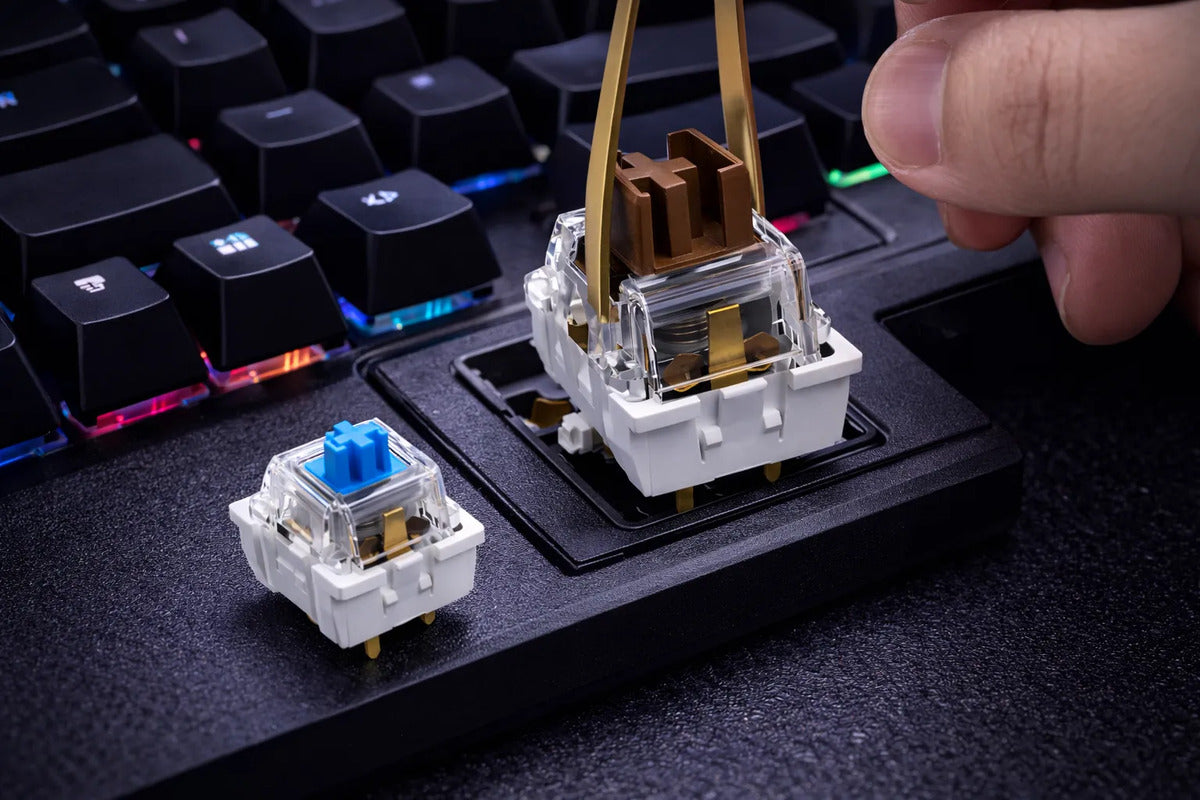
Its structure features a brown stem with side wings near the cross-shaped mount, a transparent upper housing that allows viewing of the internal mechanism, and a sturdy white base, ensuring stability and durability.
Product Features
• Switch type: Mechanical
• Stem color: Brown
• Actuation type: Tactile
• Typing feel: Smooth tactile bump
• Sound level: Low to medium
• Actuation pressure: Medium
• Structure: Transparent housing and white base
• Keycap mount: MX standard cross
Switch Structure
This model features:
• Brown stem with stabilizing side wings
• MX standard cross-shaped mount
• Transparent upper housing
• White bottom base
• Internal metal spring
• Metal contacts for actuation
This construction offers good keypress response and high durability.
Pin Type
This switch has 3 pins (3-Pin):
• 2 metal pins responsible for electrical contact
• 1 central plastic pin responsible for alignment
Compatible with various mechanical keyboards that use removable switches.
Difference Between Brown and Blue Switches
Brown Switch
• Features smooth tactile feedback
• More discreet sound
• No loud click
• Ideal for typing and daily use
Blue Switch
• Features strong tactile feedback
• Loud audible click
• Louder
• Widely used for traditional mechanical typing
Compatibility
Compatible with mechanical keyboards that use:
• MX standard switches
• MX standard keycaps
• Hot-swappable keyboards or compatible PCBs
Recommended Use
Ideal for:
• Gaming
• Extended typing
• Work
• Daily use
• Mechanical keyboard maintenance
• Custom keyboard assembly
Technical Specifications
Type: Mechanical keyboard switch
Model: Brown Switch (Tactile Brown)
Stem shape: MX standard cross
Pin type: 3-pin
Material: High-resistance plastic and metal contacts
Estimated durability: up to 50 million actuations
Frequently Asked Questions
Does the brown switch click?
It does not have a loud audible click like the blue. It only has a soft tactile feedback.
Does it make noise?
It only makes the normal sound of the key, being quieter than the blue switch.
What is the advantage of the brown switch?
It offers a balance between comfort, tactile response, and low noise.
Does it work with any keyboard?
It works with mechanical keyboards compatible with MX standard switches.
Do the keyboard keys fit on it?
Yes. It has an MX standard cross mount compatible with mechanical keycaps.
The Brown Mechanical Switch is a component used in mechanical keyboards that offers smooth tactile feedback with a low noise level, being considered one of the most balanced models in terms of performance, comfort, and quietness.
Unlike the blue switch, which has a strong audible click, the brown switch only has a slight tactile feedback (bump) at the moment of actuation. This means that the user feels the key's activation point, but with a much more discreet sound.
For this reason, the brown switch is widely used by those seeking a comfortable mechanical experience for typing, gaming, and daily use, especially in environments where excessive noise is not ideal.
Its structure features a brown stem with side wings near the cross-shaped mount, a transparent upper housing that allows viewing of the internal mechanism, and a sturdy white base, ensuring stability and durability.
Product Features
• Switch type: Mechanical
• Stem color: Brown
• Actuation type: Tactile
• Typing feel: Smooth tactile bump
• Sound level: Low to medium
• Actuation pressure: Medium
• Structure: Transparent housing and white base
• Keycap mount: MX standard cross
Switch Structure
This model features:
• Brown stem with stabilizing side wings
• MX standard cross-shaped mount
• Transparent upper housing
• White bottom base
• Internal metal spring
• Metal contacts for actuation
This construction offers good keypress response and high durability.
Pin Type
This switch has 3 pins (3-Pin):
• 2 metal pins responsible for electrical contact
• 1 central plastic pin responsible for alignment
Compatible with various mechanical keyboards that use removable switches.
Difference Between Brown and Blue Switches
Brown Switch
• Features smooth tactile feedback
• More discreet sound
• No loud click
• Ideal for typing and daily use
Blue Switch
• Features strong tactile feedback
• Loud audible click
• Louder
• Widely used for traditional mechanical typing
Compatibility
Compatible with mechanical keyboards that use:
• MX standard switches
• MX standard keycaps
• Hot-swappable keyboards or compatible PCBs
Recommended Use
Ideal for:
• Gaming
• Extended typing
• Work
• Daily use
• Mechanical keyboard maintenance
• Custom keyboard assembly
Technical Specifications
Type: Mechanical keyboard switch
Model: Brown Switch (Tactile Brown)
Stem shape: MX standard cross
Pin type: 3-pin
Material: High-resistance plastic and metal contacts
Estimated durability: up to 50 million actuations
Frequently Asked Questions
Does the brown switch click?
It does not have a loud audible click like the blue. It only has a soft tactile feedback.
Does it make noise?
It only makes the normal sound of the key, being quieter than the blue switch.
What is the advantage of the brown switch?
It offers a balance between comfort, tactile response, and low noise.
Does it work with any keyboard?
It works with mechanical keyboards compatible with MX standard switches.
Do the keyboard keys fit on it?
Yes. It has an MX standard cross mount compatible with mechanical keycaps.
Enviar